GRE Numeric Entry Questions: Complete Guide and Practice
Numeric Entry is the only GRE question type with no answer choices to eliminate. You see a blank box, you type a number, and that number is either right or wrong. There is no process of elimination, no back-solving, and no educated guessing. These questions appear across all four math domains — Arithmetic, Algebra, Geometry, and Data Analysis — and they test whether you can set up a problem correctly, execute every calculation accurately, and follow formatting instructions precisely. This guide covers the format, walks you through two fully interactive examples, and gives you six practice problems with step-by-step solutions drawn directly from our audited question bank.
What Are Numeric Entry Questions?
Numeric Entry is one of four question types in GRE Quantitative Reasoning. Unlike Multiple Choice, Multiple Answer, or Quantitative Comparison, Numeric Entry provides no answer choices whatsoever. You must compute the answer yourself and type it into a blank box on screen. The question itself tells you which input format to use: a single box for integers or decimals, or two stacked boxes separated by a fraction bar when the answer must be given as a fraction.
The GRE scoring system accepts mathematically equivalent forms of the same value. For example, 2.5 and 2.50 are both accepted, 0.5 and .5 are both accepted, and fractions do not need to be reduced — 4/8 and 1/2 and 2/4 are all accepted for the same answer. However, when a question includes rounding instructions such as "to the nearest 0.01" or "to the nearest whole percent," you must follow that instruction exactly. The scoring system checks against the correctly rounded value only.
Three input formats to know: (1) A single box for an integer — type a whole number like 42 or -8. (2) A single box for a decimal — type a value like 3.75 or 0.5. (3) Two fraction boxes — type the numerator in the top box and the denominator in the bottom box. The question stem always tells you which format to expect.
4 Math Domains You'll See
Numeric Entry questions appear across all four GRE Quantitative Reasoning content domains. Each domain brings different computational demands and common pitfalls. Recognizing the domain quickly helps you choose the right strategy.
1
Arithmetic
Percents, ratios and proportions, rates and unit conversions, properties of integers (divisibility, primes), and operations with fractions and decimals. These questions test precise multi-step computation — a single slip produces a wrong answer with no choices to flag it.
2
Algebra
Equations, inequalities, functions, sequences, and word problems involving unknowns. You must set up the algebra correctly and solve with exact values. Common topics include systems of equations, work-rate problems, and function composition.
3
Geometry
Circles, triangles, quadrilaterals, coordinate geometry, and three-dimensional figures. Many questions require applying formulas like area, perimeter, or the Pythagorean theorem and computing an exact decimal or integer result.
4
Data Analysis
Statistics (mean, standard deviation), probability, frequency distributions, and data interpretation from tables and graphs. You may need to compute a weighted mean from a frequency table or find a conditional probability — both common NE formats.
How to Solve Step by Step
These strategies apply to Numeric Entry questions across all four domains. Because there are no answer choices, your computation must be flawless from setup through final entry. Work through these habits on every problem.
Before diving into exact computation, make a rough estimate of the answer. If a question asks for the area of a figure with dimensions near 10 and 12, the answer should be in the ballpark of 120. If your final exact answer is 1,200 or 12, you know immediately to re-examine your work. Estimation is especially valuable on Numeric Entry because there are no choices to signal that something has gone wrong.
Read the last sentence of the question twice. Common misreads include confusing "what percent" (enter 25) with "what fraction" (enter 0.25 or 1/4), missing "how many more" versus "how many total," and forgetting unit conversions when the question asks for minutes but your computation yields hours. On Numeric Entry, the wrong unit or format means zero credit.
After you compute an answer, plug it back into the original conditions. If the question says "A 20% discount off the original price yields a selling price of $180," and you compute the original price as $225, verify: 20% of $225 is $45, and $225 - $45 = $180. This takes 15 seconds and catches the majority of arithmetic errors. On multiple choice you can check against the options — on Numeric Entry, plugging back is your only safety net.
Reduce fractions, cancel common factors, and simplify expressions before multiplying large numbers. This minimizes the chance of arithmetic errors and makes mental verification easier. For example, (5/8) x 16 is easier computed as 5 x 2 = 10 than as (5 x 16) / 8 = 80 / 8 = 10.
"To the nearest whole number" means round and enter an integer. "To the nearest 0.01" means exactly two decimal places. "To the nearest whole percent" means compute the percentage, then round to an integer. If the exact answer is 33.333% and the question says "to the nearest whole percent," the only accepted answer is 33. Entering 33.3 or 33.33 will be marked wrong.
Without answer choices to serve as a sanity check, arithmetic errors are the leading cause of wrong answers on Numeric Entry. After computing your answer, redo the final calculation using a different method or work the problem backwards. If both approaches give the same answer, you can enter it with confidence.
Pro tip: On the real GRE you have an on-screen calculator. Use it to verify — not to compute from scratch. Set up your equations on paper or in your head first, then use the calculator to confirm intermediate values. This prevents keystroke errors from propagating silently through your work.
Worked Example: Percent Change
This example teaches the fundamental percent change formula applied to real-world data. The key insight is that percent change always uses the original value as the denominator — a rule the GRE tests frequently.
Interactive Walkthrough0/5 steps
Computing Percent Decrease
A town's population dropped from 12,500 at the start of the decade to 10,750 at the end.
What is the percent decrease in the town's population? Give your answer to the nearest whole percent.
1
Step 1: Identify the percent change formula
Percent change = (Change / Original) × 100. What is the original value here?
2
Step 2: Compute the change
3
Step 3: Compute the fraction
4
Step 4: Convert to a percentage
5
Step 5: Verify the answer format
Worked Example: Multi-Step Unit Conversion
This example demonstrates how the GRE uses multi-step unit conversion problems in Numeric Entry format. The key is executing each arithmetic operation carefully and paying close attention to the units requested in the question.
Interactive Walkthrough0/4 steps
Converting Units in a Rate Problem
A factory produces 3,240 components during each 8-hour shift. Each component requires 0.15 kilograms of raw material.
How many kilograms of raw material does the factory consume per minute during a shift?
1
Step 1: Find the total raw material per shift
3,240 components × 0.15 kg each = ? kg total per shift
2
Step 2: Convert the shift length to minutes
3
Step 3: Compute the rate per minute
4
Step 4: Decide on rounding
Practice Questions
Now apply what you have learned across all four domains. Each question below is drawn from our audited question bank. After you submit your answer, click through the step-by-step solution.
Practice format note: On the real GRE, Numeric Entry questions have no answer choices — you type your answer directly into a blank box. These practice questions present five choices so you can check your reasoning interactively. When you study, always practice writing your answer before looking at the options.
Question 1 — Algebra: Composite Functions
If f(x)=2x2−3x+1 and g(x)=x+5, what is the value of f(g(2))−g(f(2))?
Your Answer:
Question 2 — Arithmetic: Average Speed
A train travels from City X to City Y at an average speed of 60 miles per hour and returns from City Y to City X at an average speed of 40 miles per hour. What is the average speed, in miles per hour, for the entire round trip?
Your Answer:
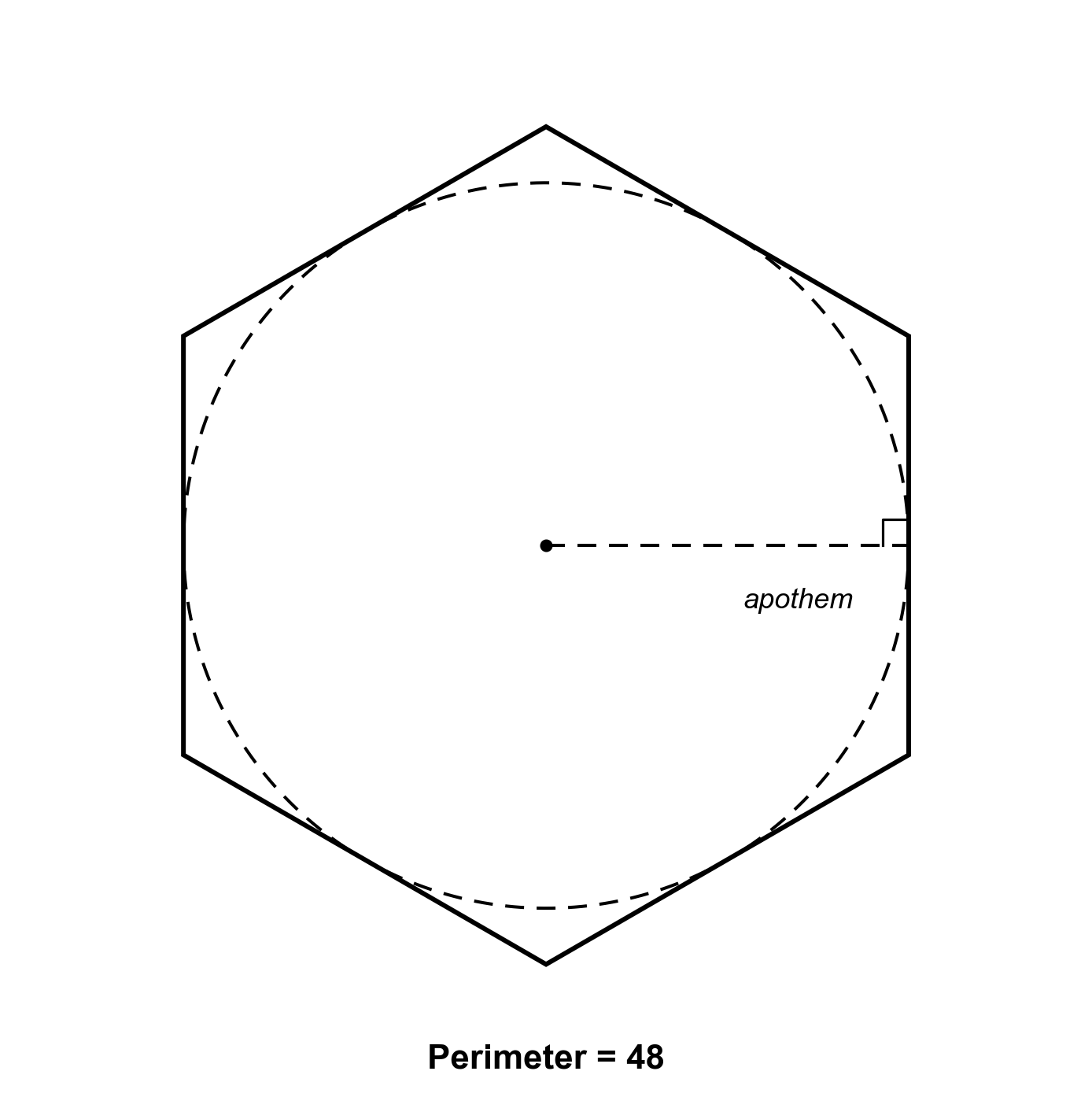
Question 3 — Geometry: Inscribed Circle
A regular hexagon has a perimeter of 48. What is the area of the largest circle that can be inscribed in the hexagon? Give your answer to the nearest integer.
Your Answer:
Question 4 — Data Analysis: Frequency Distribution
A survey of 200 households recorded the number of electronic devices owned per household. The frequency distribution is: 0 devices (8 households), 1 device (22), 2 devices (35), 3 devices (48), 4 devices (42), 5 devices (30), 6 devices (15). What is the mean number of devices per household? Give your answer to the nearest 0.01.
Your Answer:
Question 5 — Algebra: Multi-Stage Work Rate
Pipe A can fill a tank in 12 hours, and Pipe B can fill the same tank in 18 hours. Both pipes are opened simultaneously. After 3 hours, Pipe A is shut off and Pipe C, which drains the tank at a rate of 361 of the tank per hour, is opened alongside Pipe B. How many additional hours after the switch does it take to completely fill the tank?
Your Answer:
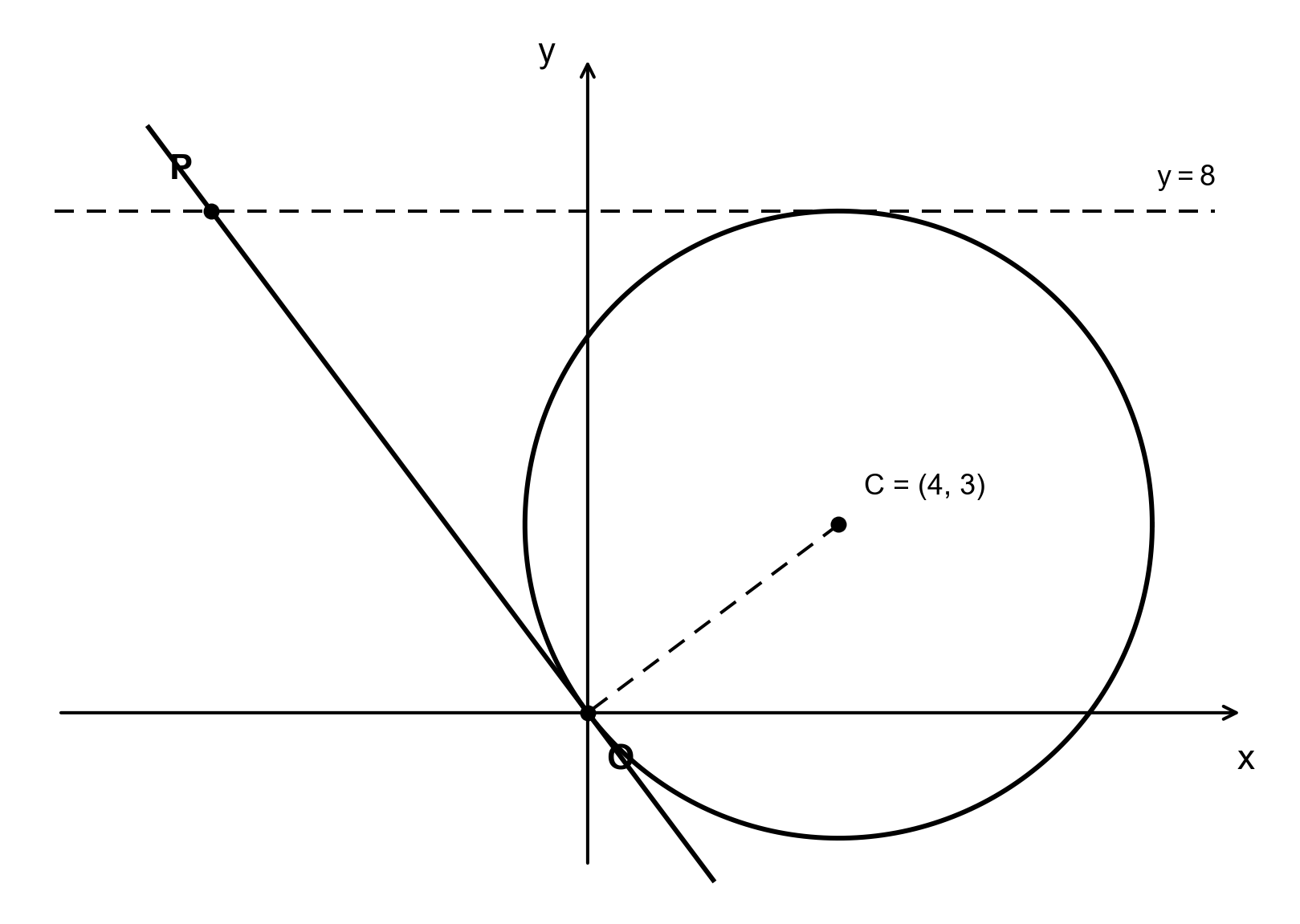
Question 6 — Geometry: Circle Tangent
In the coordinate plane, a circle has center (4, 3) and passes through the origin. A line tangent to the circle at the origin intersects the line y = 8 at point P. What is the x-coordinate of point P?
Your Answer:
Common Traps
Trap 1 — Rounding errors. Rounding instructions are not decorative — they define the only accepted answer. If the question says "to the nearest whole percent" and the exact answer is 33.333%, the only accepted entry is 33. Entering 33.3, 33.33, or 0.33 will all be marked wrong. Always re-read the rounding directive before you type your answer.
Trap 2 — Forgetting units or format. When a question asks "what percent," enter the number without a percent sign (32, not 0.32). When it asks for dollars, enter just the number (225, not $225). When it asks "give your answer as a fraction," use the two-box fraction input — entering 0.75 in a single box will not be accepted if the fraction format is required. Mismatching the answer format is one of the most frequent sources of lost points.
Trap 3 — Sign mistakes and reversed operations. Negative signs are easy to drop when there is no answer choice to remind you. On coordinate geometry problems, a negative slope or a negative x-coordinate can be lost in computation. On mixture and rate problems, forgetting to subtract (for draining) or adding when you should subtract changes the answer entirely. Write out each sign explicitly and double-check before entering.
Study Checklist
Numeric Entry Mastery Checklist0/8 complete
Frequently Asked Questions
What is a Numeric Entry question on the GRE?
A Numeric Entry question requires you to type an exact numerical answer into a blank box. There are no answer choices to select from. The answer may be an integer, a decimal, or a fraction entered into two boxes separated by a fraction bar. This is the only GRE math format where you cannot use elimination or back-solving strategies.
How many Numeric Entry questions appear on the GRE?
Numeric Entry questions typically make up about 10-15% of the Quantitative Reasoning section — roughly 2 to 4 questions per section out of 27 total. They span all difficulty levels (Easy, Medium, Hard) and can appear in any of the four content domains. Within Data Interpretation sets, at least one question is often Numeric Entry.
Do I need to reduce fractions on GRE Numeric Entry?
No. Equivalent forms are accepted. For example, 4/8 is accepted for 1/2, and 2.50 is accepted for 2.5. Fractions entered in the two-box format do not need to be in lowest terms. However, if the question says "give your answer as a fraction," you must use the fraction boxes rather than typing a decimal.
Can I use a calculator on Numeric Entry questions?
Yes. The GRE provides an on-screen calculator for the entire Quantitative Reasoning section, including Numeric Entry questions. However, the calculator does not prevent input errors. If you miskey a number, your computed answer will be wrong and there are no answer choices to flag the mistake. Always verify your calculator result against a mental estimate.
What is the most common mistake on Numeric Entry questions?
The most common mistake is entering the answer in the wrong format — for example, typing 0.32 when the question asks "what percent" (the correct entry is 32), or entering a decimal when the question requires a fraction in the two-box format. The second most common mistake is arithmetic errors in intermediate steps, which propagate silently because there are no answer choices to signal a problem. Always re-read the question's format instructions and double-check your work.